Skip to content
Local OperatorDocs

Workflow automations

Note:

Preview. The full automations guide is being written. These primitives ship today; the guide will cover each one end to end.

Wake pipelineA scheduled wake, fired with or without a terminal openSchedule a wakelop wake create <session> "in 30m" "…"The due time arrivesstored with the session — survives restartsRuntime is livethe session's own scheduler fires itno supervisor neededNothing is runningthe wake supervisor starts a runtimethe session then fires on loadA turn runs — as if a message arrivedmissed while the machine was off? skipped, not replayed60 s minimum recurrence · 16 schedules per session
A scheduled wake, fired with or without a terminal open
  • Scheduled wakes that survive a closed terminal. The agent's wake tool schedules a future turn ("check the build again in 30 minutes"). Schedules persist with the session, and a small wake supervisor starts a runtime when a session's wake is due — even if the terminal that scheduled it is long gone. lop wake status shows the next due wake and whether the supervisor is running.
  • Background jobs that report back. task always runs in the background, bash can (background=true), and every settled job auto-delivers its result when the session is idle. jobs peeks at new output since your last look.
  • lop exec --background detaches a whole task with a log file and exits immediately — the building block for cron jobs and CI steps. An agent asked for separate parallel work opens the same kind of run with the sessions tool (op=spawn), as a listed workstream by default.

A nightly loop, a build watcher, a research sweep that reports in the morning: all of them are the same three primitives arranged differently.

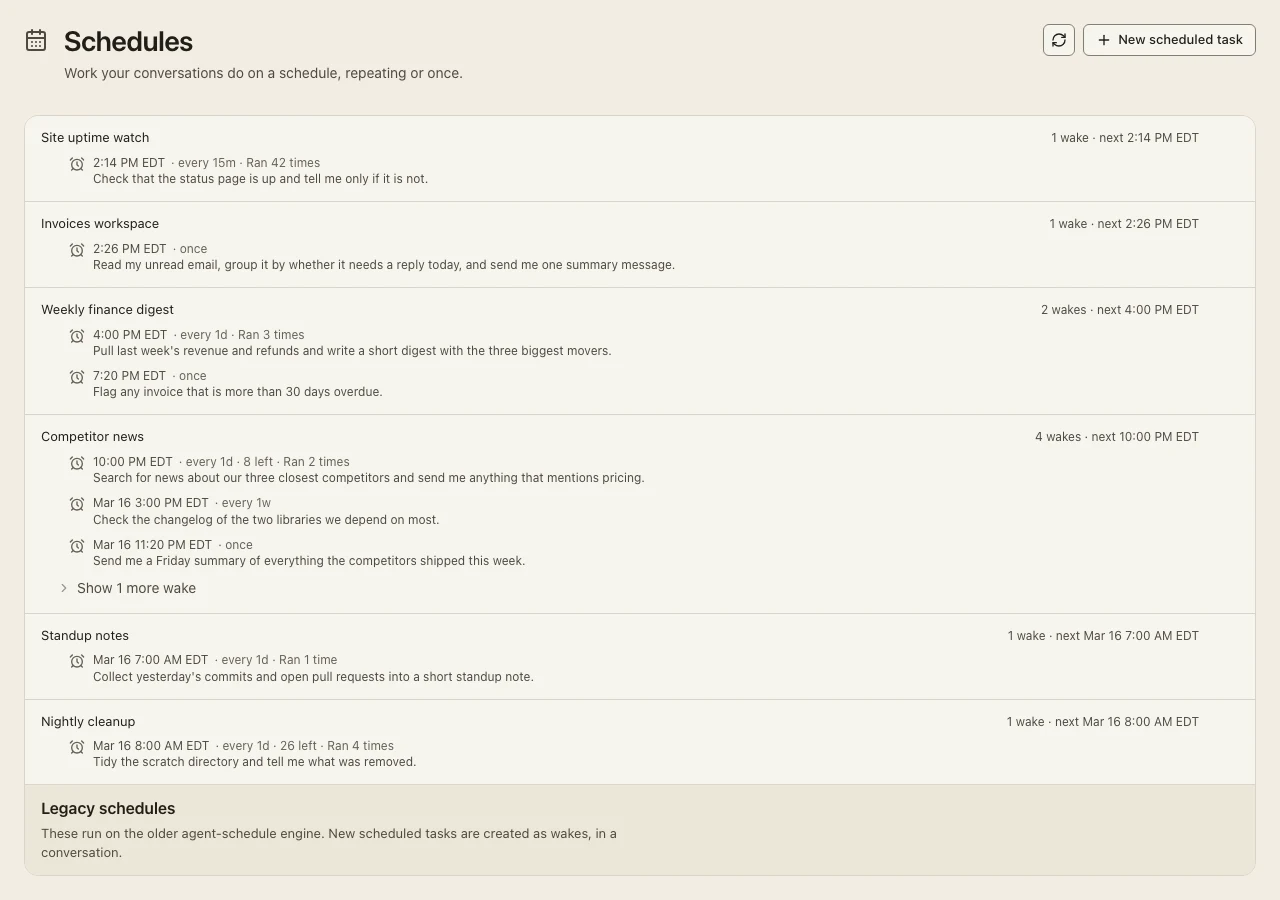
Schedules are visible where they run — a wake panel in the TUI, a Schedules page in the desktop app:
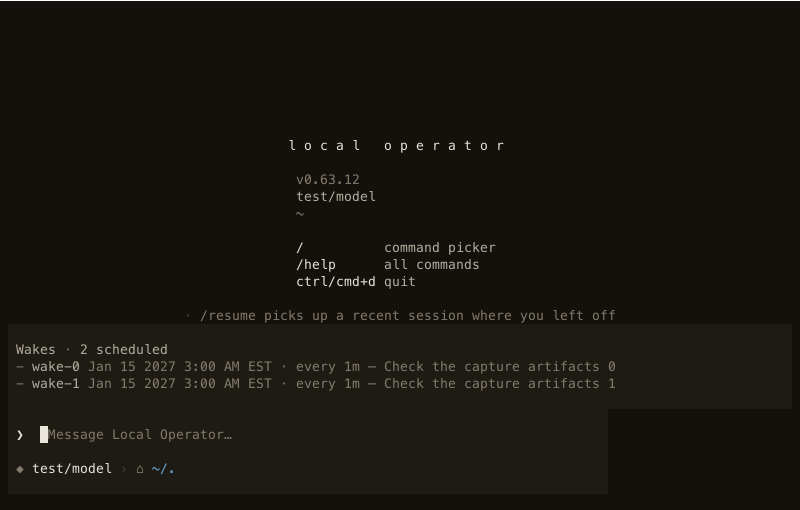
The wake panel above the TUI composer: two scheduled wakes with their next time, recurrence and message.
The wake panel in the TUI: what this session has scheduled, before it fires.
The desktop app's Schedules page: each task with its next run, cadence and run count.
The same schedules in the desktop app, with run history.

Aida, the built-in chief of staff, is the same machinery on a daily cadence — see Always-on & proactive agents.

#

Output modes

When a run's result feeds another system, prose is a parsing problem. lop exec can enforce the assistant's final response as a machine-readable payload — JSON, YAML, TOML or markdown, with an optional schema — and retry inside the same turn when the response does not conform. It is off by default: without a flag, nothing about a run changes.

A schema is a plain JSON file the decoded payload must satisfy:

json
{
  "type": "object",
  "required": ["status", "items"],
  "properties": {
    "status": { "type": "string" },
    "items": { "type": "array", "items": { "type": "string" } }
  }
}

Point a run at it, and consume the result directly:

bash
lop exec "Check the nightly build; reply as JSON" \
  --output-format json \
  --output-schema build-check.schema.json \
  --output-retries 2 | jq -r '.items[]'
  • On success, stdout is the validated payload span — stripped of any fence or prose around it, in the model's own bytes.
  • A rejected attempt logs one stderr line — ! output check failed (json, attempt 1/3): … — and the reason is fed back for the retry, inside the same turn.
  • When the retry budget is spent (default 2 retries, so three attempts), the run exits 1 and stdout stays empty: a wrong payload is worse than an empty one for … | jq consumers.

The other formats are one flag away — --output-format yaml and --output-format toml — and markdown takes {"required_sections": ["Summary", "Risks"]} as its schema: each named section must appear as a heading, in order. The exec mode page owns the per-format strictness table and the extraction rules.

The same contract is available to scripted automations through the Python SDK:

python
from pydantic import BaseModel
from local_operator.sdk import SessionSpec


class Invoice(BaseModel):
    total: int
    currency: str


spec = SessionSpec(
    output_format="json",   # enforce the final response, every turn
    output_schema=Invoice,  # model class, dataclass, TypedDict or JSON Schema
    output_retries=1,       # 0-5; default 2 (three attempts per turn)
)

The checked span arrives as an output_validation event (payload_text on success) — the same event a --json run emits for each checked attempt.